
How to Reduce Admin in Financial Advice Firms
How one system for three advisers could save a business £50k by reducing manual administration, standardising processes and using AI where it makes sense.
The admin burden for financial advisers
“Touch each piece of paper once.” Our old division manager Sandy Sanderson used to say at Allied Dunbar.
Six words that neatly spell out how to get through the burden of admin when trying to sell and expand as young sales associates. We had one eye on earnings, as we were all self-employed — “you eat what you kill” — and without a sale, you literally starved. So admin was not well liked.
Times change, and it is all about the admin now. But those targets haven’t gone away either, and so paraplanners and an army of admin have come into the workplace to ease the burden. But manpower is expensive.
Some admin is good for you. I mean advisers cannot be expected to do the most exciting advice role all day long. Set aside time for the mundane tasks as a way of prepping for the heights later on. Washing dishes is a form of therapy!
Gone are the days of the million-a-month commission figures reached by legendary life insurance salesman Peter Rosengard in July 1987 at Abbey Life. Allegedly he held meetings at breakfast, coffee, lunch and tea at Claridges. That’s four a day, and he expected to close a sale at each meeting. Of course, an army of youngsters operated behind the scenes.
But too much admin is an excuse not to get out and about. A busy office used to be a bad sign in retail financial services. “They’re all out selling!” our manager used to call out at the empty chairs — with some bravura hope, of course.

Hiring more administrators isn’t always the answer
The answer is obvious, of course. Administration is the glue that holds together the business world, and it is always there, and can never be dispensed with in any serious organisation with intent to survive for the longer term.
While we are all seeking to reduce administration, it is, in essence, not something that can be wished away. Like sleep, food and bank accounts — we need it. It is a necessary background to facing the world in business.
But if we cannot reduce the amount of administration in our lives, how do we reduce the time spent on it? Sleep less, eat less often or dispense with bank accounts? Perhaps not.
The answer is efficiency, and tapping into the wonderful world of computing power. Just as written maths replaced the abacus, and Excel the calculator, so in the same way AI is changing how repetitive information work is handled.
Hiring more staff increases payroll. Information technology can reduce costs, save time and increase productivity — and here we show you how.
Where is your admin costing you lost time?
The first step is to map out your current administrative processes. You are paid to advise clients, so don’t even try and reduce the time spent in front of potential clients. That is what advisers, and firms employing advisers, are paid to do — talking to people makes money.
Cut into the admin processes. Map them out on a piece of paper: research before sitting in front of a client, writing a fact find, researching the solutions, filing the new business, pushing it through, writing suitability reports and then chasing the commission.
All that occurs over several months, and once complete, you start again. Of course you have multiple cases on the go, and so there is a pipeline, and that too needs a tracking tool.
I would break these processes down into advice and compliance steps, where broadly advice steps happen before you sell the case, and compliance is what happens next. It is a bit more complicated than that, because compliance should run through everything advisers do.

1. Fact find: around 30 hours per adviser, per year
Firstly, on the fact find stage: use electronic recording. Famously advisers are protective of their fact finds, and so find a configurable fact find (that rules out Intelliflo’s FF!) that is held online in a browser.
So it travels with you, can be opened at will, and of course all amendments will be tracked. The point-in-time FF is just an earlier version of the current FF. Each piece of advice is a point in time, and so save or print FF is a key feature of systems.
An electronic FF still requires typing in and manual entries, so the time saving in itself is not huge — perhaps just 20 minutes per fact find, where an adviser generates two fact finds per week, the vast majority being simply print-outs showing no change or minor additions. That is a saving of 40 minutes per week, or just over 30 hours per adviser per annum.
- ≈ 30 hours saved per adviser / year
2. Research: around 50 hours per year
Secondly, research. When I first started, advisers still had rate books the size of Church Bibles, where they could look up the rates of any life, given the age and premium. A small laptop was available for rent in the Allied Dunbar offices to allow advisers to look up rates, pump in the date of birth, sex and type of insurance required, and see the monthly premium pop up on the PC.
Well, it is all on a browser now. Find a system that can take the key data explained above and automatically populate the quote. iPipeline has a nudge system to enable up-sales; it provides a neat “what about adding CI for x premium?” type feature to any quote provided.
Using computerised research, BAT believes, saves a firm some 30 minutes per case over using magazines, printed material and brochures. If true, then at two cases per week that is an hour a week in total, or around 50 hours per annum.
3. Presentation: around 50 hours per year
Next step is the presentation. The fun bit. Printing reams of paper for a meeting is old hat. I propose PDFs, concepts, explanations and one or two pages to illustrate a key point. The rest can follow, even by WhatsApp PDF sent while talking.
Save all that time around the printer that has run out of ink. Save, we say, 30 minutes per case, where each adviser does two cases per week. That is an hour a week in total, or around 50 hours per annum.
4. Suitability reports: let the fact find feed the report
Nowadays there are tools for writing suitability reports. So get them out there into your office. Everyone works from a template, but if using IT, then the FF should feed the SR.
An easy suite leads from FF to SR in a process at BAT we call Advice Cases. The benefit is that you can add multiple policy sales to the same process, and at the end it churns out the SR for the customer, pre-built for all choices and products.
5. Document completeness: stop skilled file checkers doing basic admin
A sale of a fund, policy or savings plan means many documents accumulating. The average in the BAT system is about 30 documents per sale. Mortgages include bank statements, payslips and background information on the property, and that is even before you get to the client.
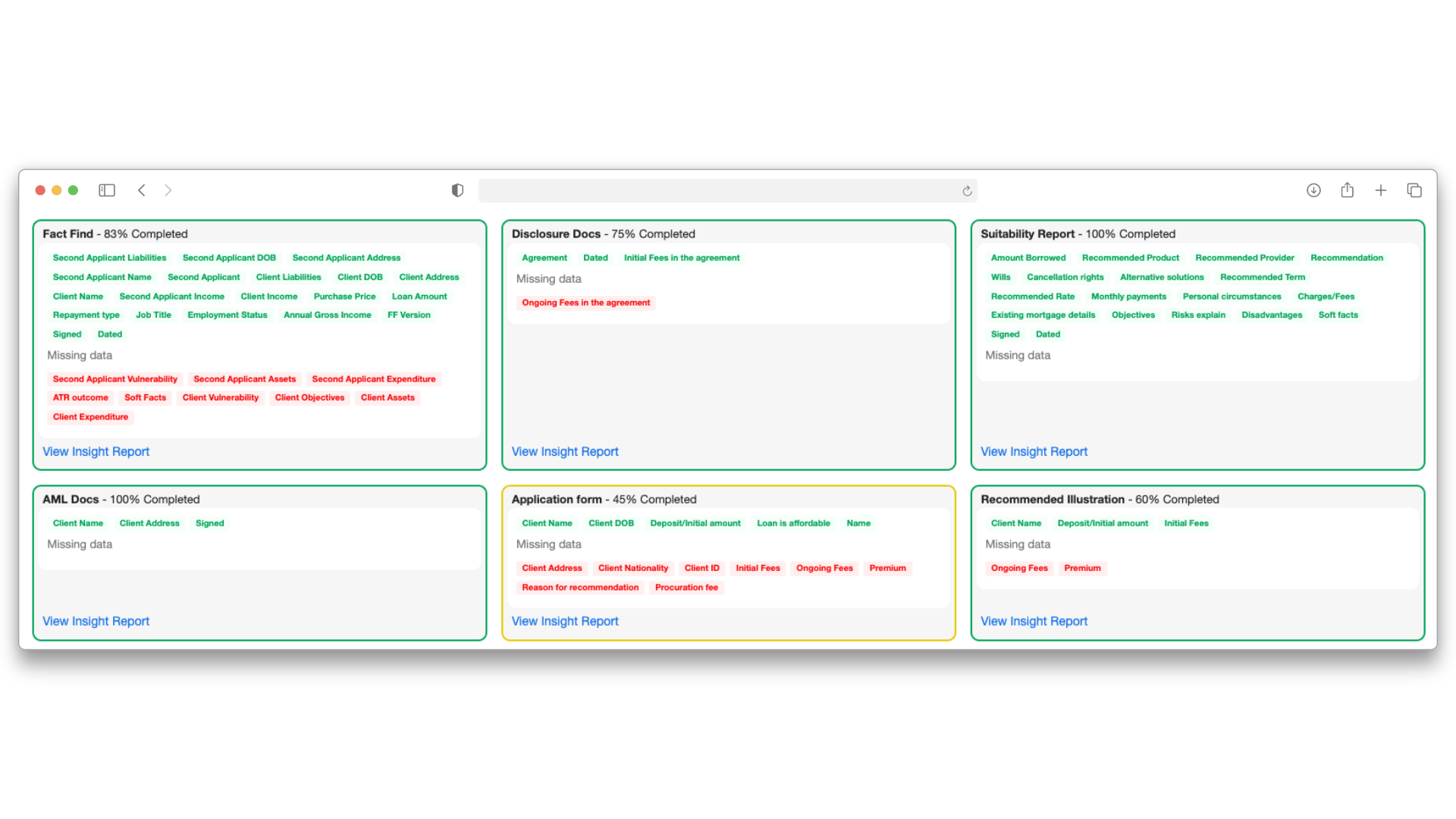
So in BAT we developed an AI file checker. You drag these documents into the file and, hey presto, you get it checked and sorted by the AI, and scored even before you go near the client. That is some serious saving in time.
For post-sale file checks this “document completeness check” takes up an amazing amount of file checker time. In fact, it has been timed at 20 minutes per file just to assess whether the file is ready to check.
Nothing is more frustrating to a skilled file checker than spending twenty minutes only to find that the AML documentation is incomplete or doesn’t match the name on the passport.
Why not let the machine do this for you, in real time, almost instantly and with cross-checking?
Standardising core processes
The computerisation of the back office enables firms to standardise the process. This creates consistency, and workflow patterns make it easier to check compliance.
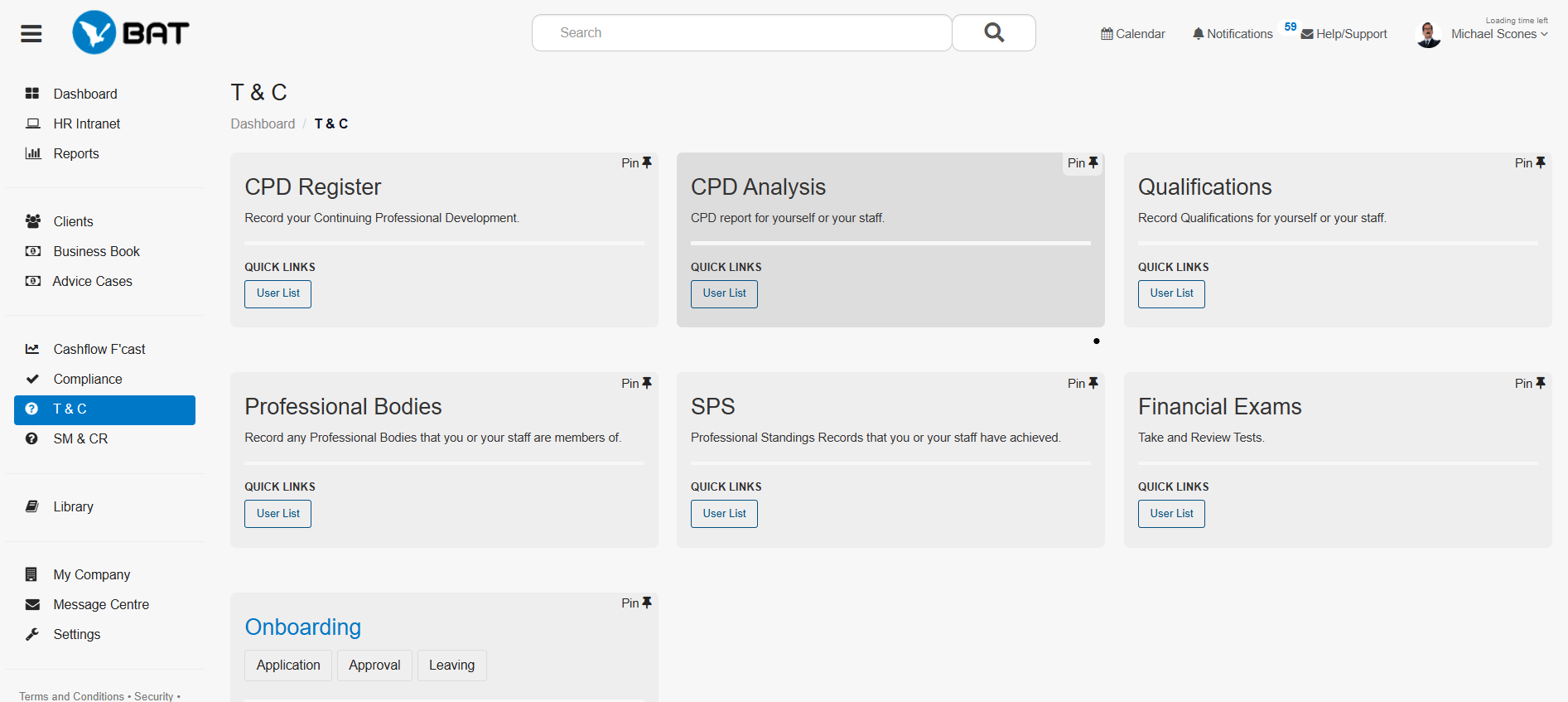
All advisers need to complete T&C, and so what is easier than uploading an exam onto BAT, or any other system, and simply asking staff to complete it by whatever deadline your manager decides? The system chases up completion, delivers scores, tracks performance and adds non-compliance to the breach system.
BAT analyses usage of the system, and we know that each adviser must log approximately 50 hours of CPD per annum. Standards vary depending on licence type, professional standards body and whether informal or formal work is required.
But if using a manual system takes five minutes per hour more to log, on the side of compliance trainers and advisers, then you are looking at an annual saving of approximately eight hours per adviser.
- ≈ 8 hours saved on T&C / CPD admin
Compliance and administration
When I first started visiting compliance officers, offering up external validation with IFAC doing training, compliance external file checks, complaints management and so on, there was one set of documents that sat behind every compliance manager’s desk.
Lever arch files were neatly named: Compliance Manual, T&C Manual and Procedure Manual. Alongside stood a “Breach Register” and “Complaints” file. There may even have been a document library, containing templates for all sorts of documents, from Client Agreements to SR reports.
A document library, we estimate, being online saves countless emails and back and forth — one hour per adviser and one for compliance, where each email takes fifteen minutes to send and reply with the correct documents, and advisers ask quarterly.
All this now sits inside the box at BATSOFT. There is a document library, a section for the templates, and these are editable. There is also an auto-report feature that generates configured documents.
Promotion checks
The promotion section enables staff to upload promotions, get them checked online, and keep communications, sign-offs, expiry dates and procedures surrounding the promotion marked up inside BAT.
Most advisers do about four promotions per annum. If each one saves compliance and adviser 15 minutes together, that is around one hour per adviser, per annum.
Auto SR reports
The auto-report feature provides uniformity in a firm. The time saving is approximately 20 minutes per case.
With the average adviser doing two cases per week, that makes approximately 33 hours saved per adviser, per annum.
Audits: keep the work, actions and deadlines in one place
There is a section for audits. These can either be external audits or internal audits, and the key information is retained there, deadlines set and chased automatically by machine.
The audit stays there from start to finish, in one easily definable place. There are review forms for different types of firm, upload and download features, issues, actions and deadlines. BAT believes that its sister firm saves one hour per audit by using a system to record the information. With an annual audit, that is one hour per annum saved, per RI.
The breach register
The breach register is a perennial disappointment to compliance auditors. It sits proudly inside the compliance drawer of BAT, and is used but sparingly by firms. How so? Are they frightened to display their washing in public?
Other firms use it to breach individual staff, as a way of bringing them to heel. Breach for this, or for that, is a first step towards freezing commission payments — the ultimate sanction for advisers. Without commission, they soon get their compliance into line.
The network, principal or licence-holding SMF16 holds all the cards, and no adviser can win an argument with them. The key is to have a system that keeps all parties on the same page, hence the breach register.
Breaches are perfect to enable firms to keep a record of minor issues. Documents not delivered, promises not kept and so on. You can scotch them off again, mark them as sorted, or leave them outstanding, in which case the pop-up in BAT will remind them to sort the issue out. Zero breaches is unconvincing.
Custom registers: build the process around the firm
The breach register disappointment, for compliance nerds like myself, is balanced off by a feature that was recommended by our IT staff at BAT, namely the Custom Register section.
The Custom Register section on BAT took off almost as soon as the code was published, such that most firms of any scale use and customise registers themselves for their firm procedures. They’ve all got one!
There is a choice of templates reminding ourselves of the terrors of compliance and procedures for advisers inside networks and large IFA or mortgage broking firms. There are templates ranging from Gift and Entertainment Registers, Security Breach Registers, cybersecurity registers and Due Diligence Registers, enabling firms to keep track of their research. Customising registers enables firms to tailor their own.
BAT custom registers save about twenty minutes per register. That is the amount of time it takes to write a register from scratch, print it, bind it and add to it whenever required, using Excel or some other method. If the average firm gets one register out monthly per adviser, that makes four hours per annum saved.
- Gift & entertainment registers
- Security breach registers
- Cybersecurity registers
- Due diligence registers
Custom registers appeal because one feature of the financial services industry is the sheer variety of types of firm, each with their own procedures and modus operandi.
I know from experience that this annoys the regulator, the Financial Conduct Authority, who, as a result, find it hard to consolidate findings. One example is in their file-checking research, which revealed alarming levels of failure, but little actual customer detriment.
For reasons I will never understand, the FCA chose to spin it as a good news story in 2016. In the review below, the FCA presents the findings, yet the numbers do not lie. Just about half of all files shown to the FCA were either uncertain or unacceptable — with the vast majority displaying unacceptable disclosure. Awful.
FCA: Assessing Suitability Review
Read the FCA’s multi-firm review on suitability, disclosure and customer outcomes.
View the FCA reviewOf course customer detriment comes next, and it is very low. But it always was low, as a proportion of the whole, and if that is the only measure that counts — the big if — then we are all charging a lot of money to clients for higher compliance standards that are used to show compliance to those who regulate us.
Finally, file checking — where the biggest saving sits
Finally we come to file checking, which is central to the BAT system. BAT set out on a path to use AI to check files. Checking about a thousand cases per month in total, the system is configured around the results and requirements inside each firm.
The AI takes all document types, including multiple Excel tabs, and churns out results like magic. Each firm has specific questions that it wants answered, so the more consistently a firm uses its checking process, the more useful the system becomes for that firm.
BAT also runs suitability checks using AI, and this provides results that are 80% accurate at time of writing. We believe that individuals are aligned at about an 85% level. Send your file to two different file checkers and you can expect two sets of results, and disagreement on outcome in about ten per cent of cases checked and scored.
BAT AI File Checker saves two hours per file check, of which 20 minutes saved is simply checking for completeness, and the judgement saves another one hour and 40 minutes. That is the time it takes a qualified, experienced and practising file checker to check and report on your files.
If the average firm gets one file check out monthly per adviser, that makes 24 hours of saving per annum.
But if you are checking 100% of files, and most advisers do two cases per week, then that makes an astonishing saving of approximately 200 hours per annum. Now we are talking real money.
Conclusion: what could the time saving look like?
If you add up the above savings, then you have an approximate value per adviser on time saving alone. This says nothing about the ongoing security, space and process improvements, but on time alone, the figures in the article are shown below.
| Administrative area | Estimated annual saving |
|---|---|
| Fact find, including risk profile | 30 hours |
| Research | 50 hours |
| Presentation | 50 hours |
| T&C | 8 hours |
| Document library | 2 hours |
| Promotion checks | 1 hour |
| Auto SR report | 33 hours |
| Audits | 1 hour |
| Custom registers | 4 hours |
| File checking: suitability + completeness | 200 hours |
- Source draft states: 483 hours per RI / year
Multiply that number up by the number of advisers, and perhaps knock off 10% for each additional five advisers, as economies of scale kick in. With a total number of billable hours per annum set at 1,000 for a professional, you only need three advisers to use a single system before you are looking at the equivalent capacity of an additional role in your organisation.
Most compliance salaries cost a firm £50k. So hey presto — your system has potentially saved you £50k. And that’s an annual saving.
Payroll has legs, but hopefully this article has shown you how to cut the legs off payroll, and at the same time increase efficiency and standardisation, and save yourself £50k in the process.
Author admission: we left out the cost of BAT. At £50 per month per user, there may be six users in a firm of three advisers, making a total cost of £300 per month.
See how BAT can reduce manual administration
From advice cases and document management to compliance registers and AI file checking, BAT brings the administrative process into one system.
Source
- FCA — Assessing Suitability Review Financial Conduct Authority multi-firm review referenced in the original article.